
DocuSign Integration Guidelines
Tokeny clients looking to integrate DocuSign into their subscription module should carefully consider the setup requirements and potential challenges. This article provides a step-by-step guide to help you make an informed decision and ensure a seamless integration.
1. Overview of the DocuSign Integration
The DocuSign integration allows investors to electronically sign subscription agreements directly within the Tokeny subscription module. This ensures a secure and compliant process while improving user experience.
Key Benefits:
- Seamless digital signing process
- Enhanced investor experience
- Improved compliance with digital records
- Efficient document tracking and management
2. Setting Up DocuSign API Keys
Before enabling the integration, you must generate API keys from DocuSign:
Log in to your DocuSign admin board.
Navigate to Integration → API and Keys (DocuSign Admin Panel).
Create a new application (if none exists).
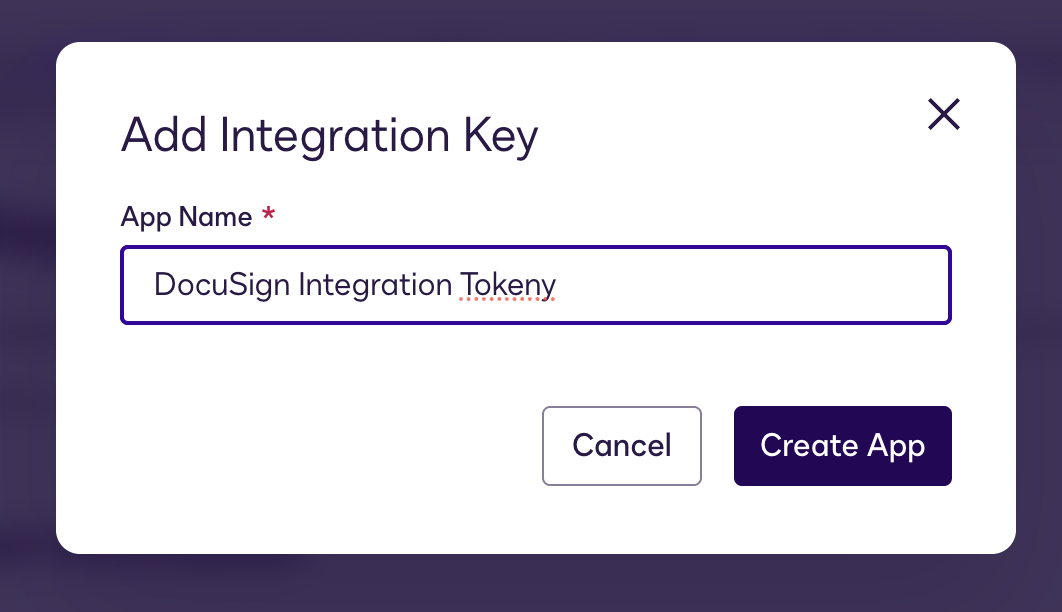
Access the new Application and generate the RSA private key

Ensure a redirect URI (e.g., http://localhost) is set in the App settings.

Once all the keys are set up, share the following values with CSM/Support for Tokeny to update your Subscription Module configuration, please indicate the Token you will need DocuSign be configured to:
| Column Name | Example Value | Description |
|---|---|---|
docusign_user_id | 18a3066a-9b0a-4a31-af9b-5c3dccb1f7a6 | User ID of the DocuSign account |
docusign_integrator_key | 0cc89306-70d7-4f94-a5e3-b62b88daa5db | Integration key of the DocuSign application |
docusign_rsa_private_key | -----BEGIN RSA PRIVATE KEY-----…=-----END RSA PRIVATE KEY----- | Ensure this is a single-line string |
docusign_template_ids | e27d3b26-7073-49d1-b474-3003179a1fcc | Template IDs for investor types |
3. Authorizing the Application
To enable the integration, the application must be authorized:
Retrieve the integration key from the DocuSign admin panel.
Authorize the app by making a request to the DocuSign API:
Do a request to DocuSign API in order to authorize the application and use the integration key as a url param in the place of integration_key key. Paste the URL in your Browser:
https://account-d.docusign.com/oauth/auth?response_type=code&scope=signature+impersonation&client_id=<integration_key>&redirect_uri=http://localhost
Grant authorization when redirected to the DocuSign authorization page:

4. Configuring DocuSign Templates
Each investor type (individual or institution) must have a corresponding DocuSign template.
Example JSON configuration:
{
      "en": {
        "individual": "e27d3b26-7073-49d1-b474-3003179a1fcc",
        "institution": "f9f37a41-6e78-4faa-8b5f-6d5aeeafe84a"
      }
    }
6. Template Variables
Tokeny’s integration allows dynamic variables to be inserted into DocuSign templates. The concept of variable is for prefiling fields. For example, of you add a text field 'Investor name' , and you configure it with the variable and non editable, it will be pre-filed automatically.
When creating the DocuSign templates, please make sure the Data Label matches the naming of the variable as shown below:
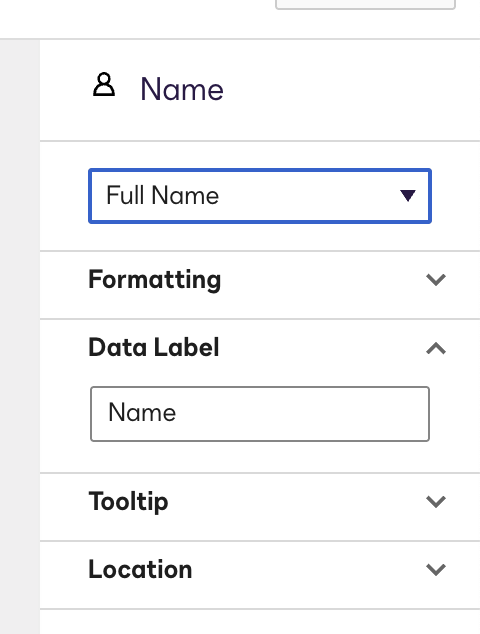
Below are the key variables available:
For individual investors
birthday: Investor birthday
building_number: Investor building number
city: Investor city
country: Investor country
currency: currency investor claimed he will use to invest
expected_amount_to_be_paid: amount in investor’s currency investor claimed he will invest
first_name: Investor first name
id_number: Investor ID number
investor_email: Investor’s email
last_name: Investor last name
name: Investor full name
phone: Investor phone number
source_of_funds: Investor source of founds
source_of_wealth: Investor source of wealth
ssn_number: Investor SSN number
state: Investor state
street: Investor street
expected_quantity_of_tokens: Quantity of tokens investor will be eligible for if he pay what he said he will
token_quantity_duplicate: same as “expected_quantity_of_tokens”
zip_code: Investor ZIP code
For Institution investors
building_number: Investor building number
city: Investor city
company: Investor’s company legal name
company_duplicate: Same as “company”
country: Investor country
currency: currency investor claimed he will use to invest
expected_amount_to_be_paid: amount in investor’s currency investor claimed he will invest
first_name: Investor first name
institution_id: Company registry number
investor_email: Investor’s email
last_name: Investor last name
legal_form: Company legal form
registry_country: Company registry country
state: Investor state
street: Investor street
expected_quantity_of_tokens: Quantity of tokens investor will be eligible for if he pay what he said he will
expected_quantity_of_tokens_duplicate: same as “expected_quantity_of_tokens”
zip_code: Investor ZIP code
7. Final Considerations Before Enabling DocuSign
Development Support: You may need developer assistance to configure API requests.
Authorization Steps: Ensure proper authorization is granted before enabling the integration.
Testing: Before rolling out, test the integration in your testing environment. In your DocuSign Admin console, under Integrations > Apps and Keys you will see your Go Live Status, you need to make 20 Successful API Calls in order to move to production and Go Live.

You can check the API Calls checking the API Dashboard under Actions:

API Dashboard:
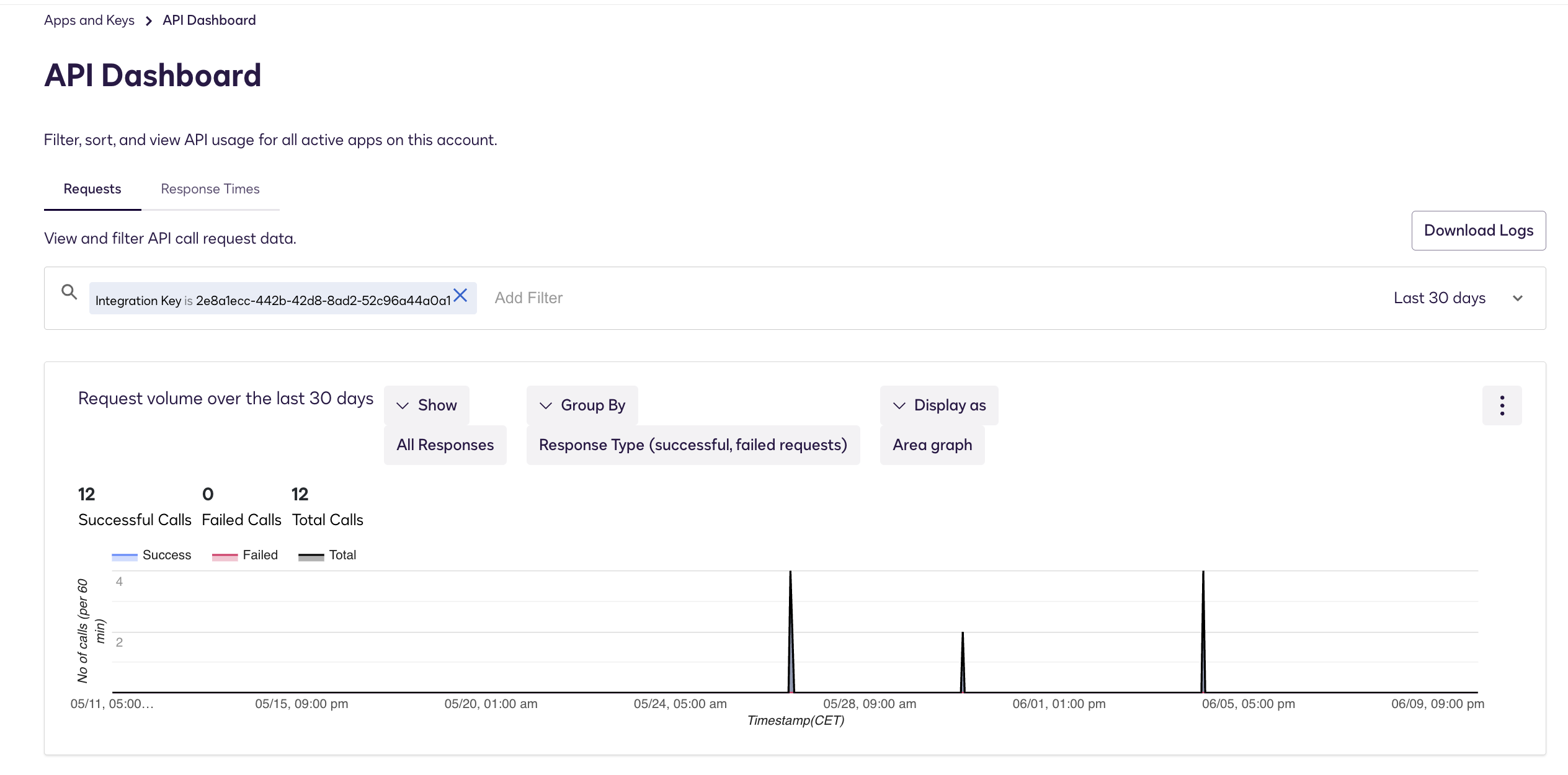
Once done you can start considering moving to production.
Investor Communication: Prepare guides or FAQs to help investors navigate the new signing process.
By following these steps, you’ll ensure a smooth DocuSign integration with your Tokeny subscription module, enhancing investor experience and compliance. If you need further assistance, feel free to reach out to our support team.